

For help with installation, bugs reports or feature requests, please head over to our new forums.
Genuitec Community on GitHub
- This topic has 37 replies, 5 voices, and was last updated 11 years, 12 months ago by
Code_A.

-
AuthorPosts
-
February 22, 2014 at 6:02 am #347446
belmontMemberSorry I haven’t posted earlier, for some reason I didn’t get a notification in my inbox.
For time being I am using the setItem code on for on change button, and the getItem code to run in the custom.js file for PostPageTransition.
I am still using a button called SAVE, however, the only function added to it, is to go to screen, basically so that it appears that it is saving the data.
So I have 3 pages.
The 3rd page has the user input fields, with the save button. On saving the page transitions to the second page,
The 2nd page is esentially a copy of the 3rd page, but all the textfields are read only, and automatically populated with the data input from page 3.
Page 1 has a list of names (which start off with placeholder text & are again automatically populated from page 3).Am pretty happy with that for time being, but I will also look into incorporating the last bit of code advise you have both shared.
_________________________
Another question, if I update my app, use the same textfield ID’s (to call the information saved to local storage) but on new pages, will update the saved data, or is the data lost on upgrade>
THank you again sooooo so much
February 22, 2014 at 8:45 am #347447
Code_AMemberThe data will still be saved in local storage when you update your app.
Keep in mind, the data is not stored or linked to a specific screen or text field, it is saved under the assigned key you defined when you used .setItem. The data stored under that key can be used anywhere in your app (i.e., any screen, any textfield, etc.) by calling .getItem.
EDIT: Fixed auto-corrected words!
March 24, 2014 at 9:00 am #348245
falloffalotMember@CincyPlanet wrote:
Instead of a save button when I want to save the text from a field into localStorage I use the text fields onChange event. This way anytime any text is placed it is ‘automatically’ saved, so it the person closes the app, or it crashes, the data is still saved.
I realize this is an old post, but this way sounds logic.
What code would I need to enter into the “OnChange” JS?Cheers J
March 24, 2014 at 9:17 am #348246
BrandonMemberThe code below can be placed in either onChange event of the text box or the onClick event of the button and the result should be the same.
Code:
localStorage.setItem(‘datafield’,$(‘#m1-locstorage-datafield’).val());March 24, 2014 at 9:39 am #348248
falloffalotMemberwow that was quick, thank you.
I input that code into the
“OnChange” > Run JavaScript > Code
Then Publish and test on my iPad2, I input text in the Text Field and exit the app.
I re-open the app and the text Field is still blank.
What am I doing wrong?March 24, 2014 at 10:14 am #348249
BrandonMemberIn your custom.js file you have to call the text back into the textbox in the startup function (document loaded) like
$(‘#m1-locstorage-datafield’).val(localStorage.getItem(‘datafield’));
March 24, 2014 at 11:28 am #348254
falloffalotMemberHaving a bit of trouble with file locations, as this file was only in the User>AppData>Temp! (is this right?)
I am assuming its the highlighted one?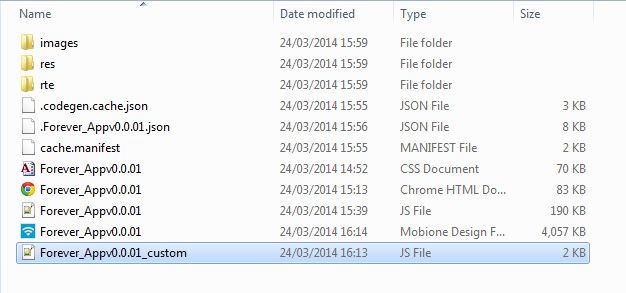
This is all the script in that file, where would I put: localStorage.setItem(‘datafield’,$(‘#m1-locstorage-datafield’).val());
/**
* Notification that the UI is about to transition to a new screen.
* Perform custom prescreen-transition logic here.
* @param {String} currentScreenId
* @param {String} targetScreenId
* @returns {boolean} true to continue transtion; false to halt transition
*/
phoneui.prePageTransition = function(currentScreenId, targetScreenId) {
// add custom pre-transition code here
// return false to terminate transition
return true;
}/**
* Notification that the UI has transitioned to a new screen.
*
* @param {String} newScreenId
*/
phoneui.postPageTransition = function(newScreenId) {}
/**
* Notification that the page’s HTML/CSS/JS is about to be loaded.
* Perform custom logic here, f.e. you can cancel request to the server.
* @param {String} targetScreenId
* @returns {boolean} true to continue loading; false to halt loading
*/
phoneui.prePageLoad = function(targetScreenId) {
// add custom pre-load code here
// return false to terminate page loading, this cancels transition to page as wellreturn true;
}/**
* Notification that device orientation has changed.
*
* @param {String} newOrientation
*/
phoneui.postOrientationChange = function(newOrientation) {}
/**
* Called when document is loaded.
*/
phoneui.documentReadyHandler = function() {
}March 24, 2014 at 12:28 pm #348257
BrandonMemberIt should be that file, but not in the temp folder. It should be in the project folder (where you saved the mobi files) in the www folder.
March 24, 2014 at 2:26 pm #348261
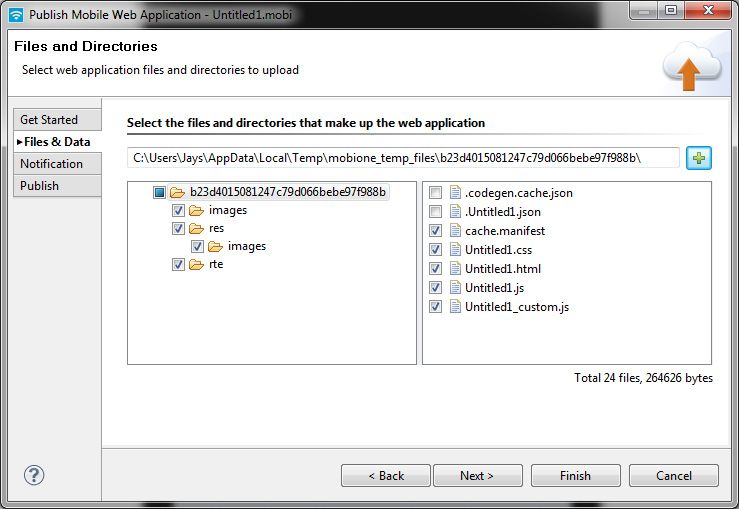
falloffalotMemberNever seen any www file or folder when I save any project!
When I try to change the destination folder I just get open > open > open > open ….etc and no option to save!
 March 25, 2014 at 9:15 am #348286
BrandonMemberThe files in the temp folder can be erased at any time, so using them for your project is probably a disaster waiting to happen.
The first thing you should do is copy your custom js file into a safe folder (my documents or desktop).
Then use this as a guide to generate your application files and copy you saved custom js file into this www folder.http://www.genuitec.com/support-genuitec/viewtopic.php?p=23844#p23844
March 25, 2014 at 12:52 pm #348290
falloffalotMemberAhhhhh….right got it!
There it is www folder yay
Thanks for help…again 😉March 25, 2014 at 1:04 pm #348292
BrandonMemberNo problem, glad you got it figured out.
March 25, 2014 at 1:38 pm #348296
falloffalotMemberGreat help as always, my only problem now is:
I have a simple text box with OnChange – Run Javascript –
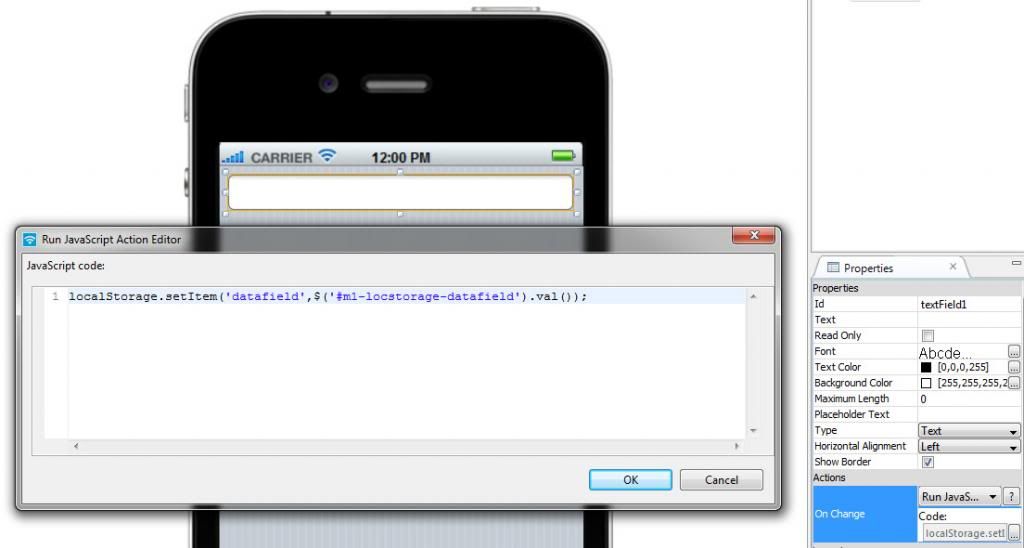
And in the Custom JS folder within www I have:
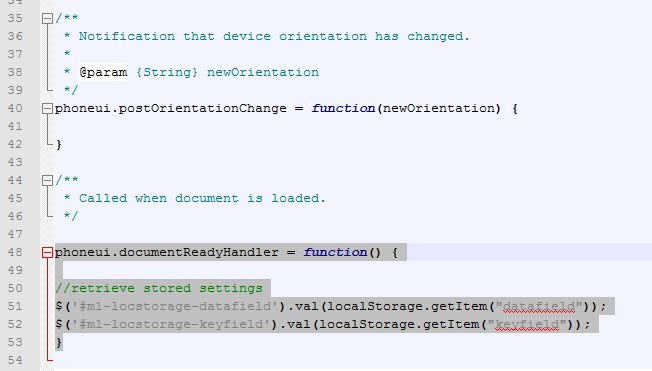
I publish and open on my iPad2 > Add to Home Screen > open App > type in field > close App!
Open App again and the text box is still blank?
This is driving me crackers guys…aaaahhhhhhhhhhhhMarch 25, 2014 at 1:45 pm #348297
BrandonMemberI cant see any real problems except maybe keep consistent with your quotation marks, use single ones in the document load also, see if that makes a difference (not sure if it will or not).
You can also use the chrome tools to check the localstorage data or
In your document load you can aslo use:
alert(localStorage.getItem(‘datafield’));to make sure the data is getting written
March 25, 2014 at 2:11 pm #348298
falloffalotMemberNope…still no go i’m afraid!
I must be be doing something really simple wrong, but I cant figure it out!
Can I just ask, all functions do work when published to a device for testing? -
AuthorPosts


