

For help with installation, bugs reports or feature requests, please head over to our new forums.
Genuitec Community on GitHub
- This topic has 7 replies, 3 voices, and was last updated 12 years, 8 months ago by
support-michael.

-
AuthorPosts
-
ASF11MemberIf I have a textarea within a vertically scrolled panel, dragging the panel to scroll it works correctly, unless the touch point is within the textarea, in that case it scrolls the entire page not just the panel, resulting in a black border at the top and bottom.
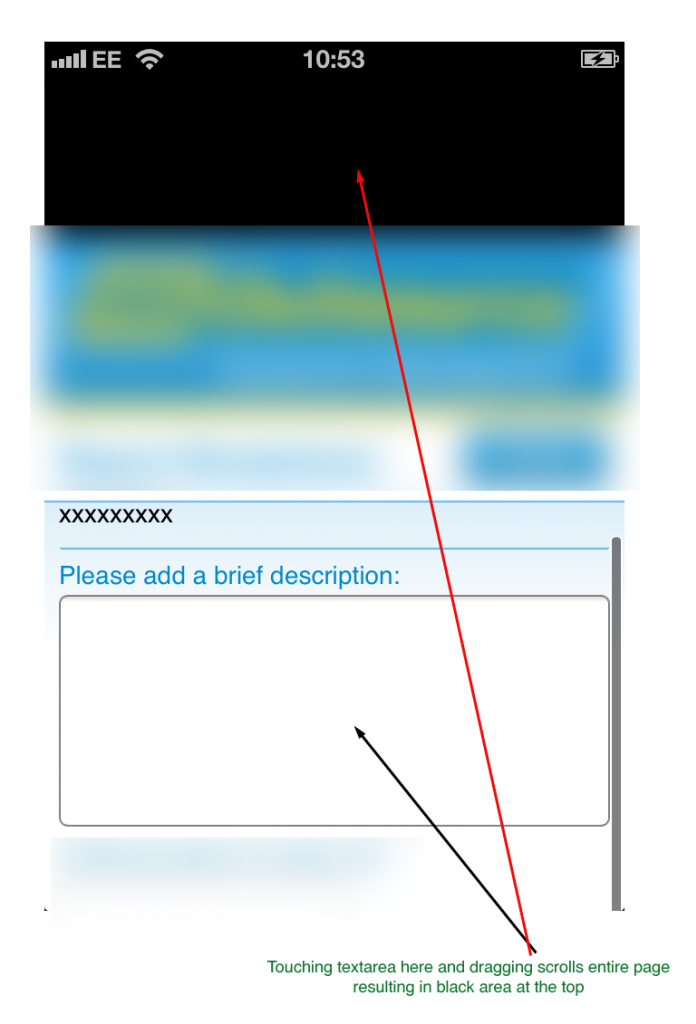
How can I prevent this happening ?
July 3, 2013 at 12:19 pm #340552
support-octavioMemberHi ASF11,
Thanks for sharing the screenshot. Can you share also details about your device like model and OS? Also can you post a sample design that can help us to replicate the issue?
July 4, 2013 at 7:21 am #340578
ASF11MemberWell, it doesn’t get any simpler. I created a .mobi (attached) from the blank template, dropped in a textarea and deployed to iPhone4 running iOS 6.1.3
Even with no panels or anything else I can use the textarea to scroll the entire screen. This is prolematic when the textarea is within a panel with a client height greater than the screen height, the user cannot scroll the panel.
Attachments:
You must be logged in to view attached files.July 4, 2013 at 11:24 am #340584
support-octavioMemberHi ASF11,
Thanks for sharing those details and the sample file. I’ve opened a bug for the issue. In the meantime a workaround is to remove m1-iscroll-no-prevent-default class from <textarea>
July 5, 2013 at 5:06 am #340602
ASF11MemberThanks, I tried the following
$(“:input[type=’textarea’]”).removeClass(‘m1-iscroll-no-prevent-default’);
in the phoneui.documentReadyHandler() function but it didn’t seem to have any effect. Caould you provide an example of the workaround ?
July 5, 2013 at 11:33 am #340615
support-octavioMemberHi ASF11,
Apologies for pointing you into wrong direction yesterday. We have realized that the only way to change this behavior is:
1.open phoneui.js
2. finddocument.addEventListener('DOMContentLoaded', function() { document.addEventListener('touchmove', function(e){ // Vadim.Ridosh: some controls (textarea and input[type=range]) // need to process touchmove, so we allow them to process it. if (e.target.nodeName.toLowerCase() != 'textarea' && !(e.target.nodeName.toLowerCase() == 'input' && e.target.getAttribute('type').toLowerCase() == 'range')) { e.preventDefault(); } }); });and change it to
document.addEventListener(‘DOMContentLoaded’, function() {
document.addEventListener(‘touchmove’, function(e){
// Vadim.Ridosh: some controls (textarea and input[type=range])
// need to process touchmove, so we allow them to process it.
if (/* e.target.nodeName.toLowerCase() != ‘textarea’ && */
!(e.target.nodeName.toLowerCase() == ‘input’ &&
e.target.getAttribute(‘type’).toLowerCase() == ‘range’)) {
e.preventDefault();
}
});
});July 8, 2013 at 7:59 am #340652
ASF11MemberThanks, this has fixed the original problem, however I can no longer scroll the textarea itself.
Is there any way to have this working correctly and also allow the textarea to scroll at the same time ?
July 8, 2013 at 11:36 am #340661
support-michaelKeymasterThe MobiOne dev team is researching this further. It is a known issue on iOS. We are investigating an approach but it could require an extensive internal change. Thus the fix is not in scope for the upcoming 2.5milestone-1 release planned for this week. We will keep you posted on our investigation.
-
AuthorPosts


